The Inspection Report Came First
Why I built As-Found around its PDF report, and how that choice shaped photo storage, page layout, save behavior and the limits of the first version.
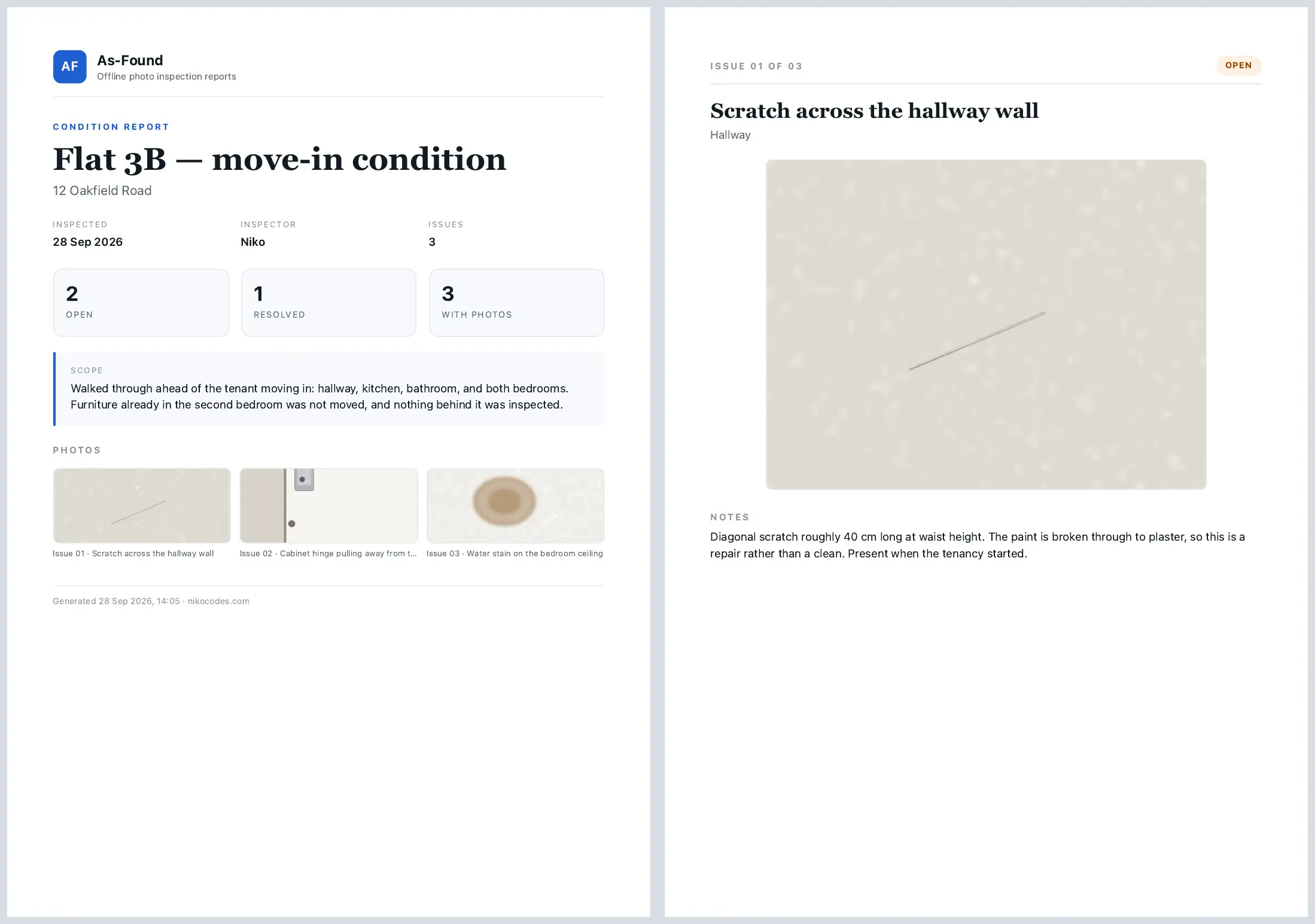
The useful end of a property inspection is a document someone else can read. They need the location, the finding and its photograph together. They should not need to install my app to understand what I found.
That became the starting point for As-Found. I built around the exported report, then gave the screens the job of collecting the information it needs. A list of inspections and an issue form matter, but neither answers whether the final document is readable.
I separated the printable model and HTML generation from the phone's filesystem and printing code. That lets the same report content become a browser preview without running the mobile interface. The repository includes fixtures for ordinary inspections, empty reports, missing photos, longer notes and deliberately awkward text. Those cases make the layout easier to inspect while it is being changed.
A photo has to fit the document
The app embeds photo data in the HTML used for PDF export. That makes the image preparation part of the report design. The export assembles those images into one document, so smaller images matter before the print step begins.
I store a report copy with a maximum long edge of 1600 pixels and a separate thumbnail up to 320 pixels. The app does not retain full-resolution originals. That is a tradeoff: enough detail for this report format, with less image data to store and carry into export. It is not an archival photography workflow.
One photo per issue follows the same constraint. Supporting several would mean deciding their order, size and relationship to the notes on the printed page. Adding another image picker would only begin that work.
A new page is not a one-page guarantee
Each issue starts on a new page. I use breaks before the following sheets and padding for the document margins, keeping those choices in the report stylesheet.
I do not force arbitrary text into a fixed-height box. New notes have a 600-character limit, but longer existing notes are preserved, and long text or many line breaks can continue onto another page. Cutting off a finding to make the page count look tidy would lose information the report exists to carry.
The template is fixed for now. There is no branding editor, issue reordering or export selection. That gives the current report a specific layout to maintain rather than a growing collection of user-configurable layouts.
Saving a replacement is part of the report too
The report is only as dependable as the saved issue behind it. A selected replacement photo stays temporary until the form is saved. New photo files get new paths; the database update comes before removal of the previous files. If a handled save fails, the new files are cleaned up and the previous saved photo remains.
That ordering matters more than a successful preview. A photograph visible in a form is not yet a committed change to the inspection.
Local storage has a clear boundary
As-Found has no account or backend for its core workflow. The inspection can stay on the phone until the user shares its PDF. That keeps the current flow small, but it also means there is no sync or backup. Uninstalling the app removes its data, and a PDF cannot restore editable inspection records.
An on-device backup is a different deliverable from a readable report. Keeping that distinction explicit gives the next feature a concrete job, instead of treating every kind of export as the same thing.