Safe WebP Queue 1.0.1: when your host can’t create WebP, your browser can
Safe WebP Queue 1.0.0 adds browser conversion for hosts that cannot write WebP. Making it fit the existing plugin also meant fixing quality settings, rejecting stale results and coordinating browser work with the server queue.
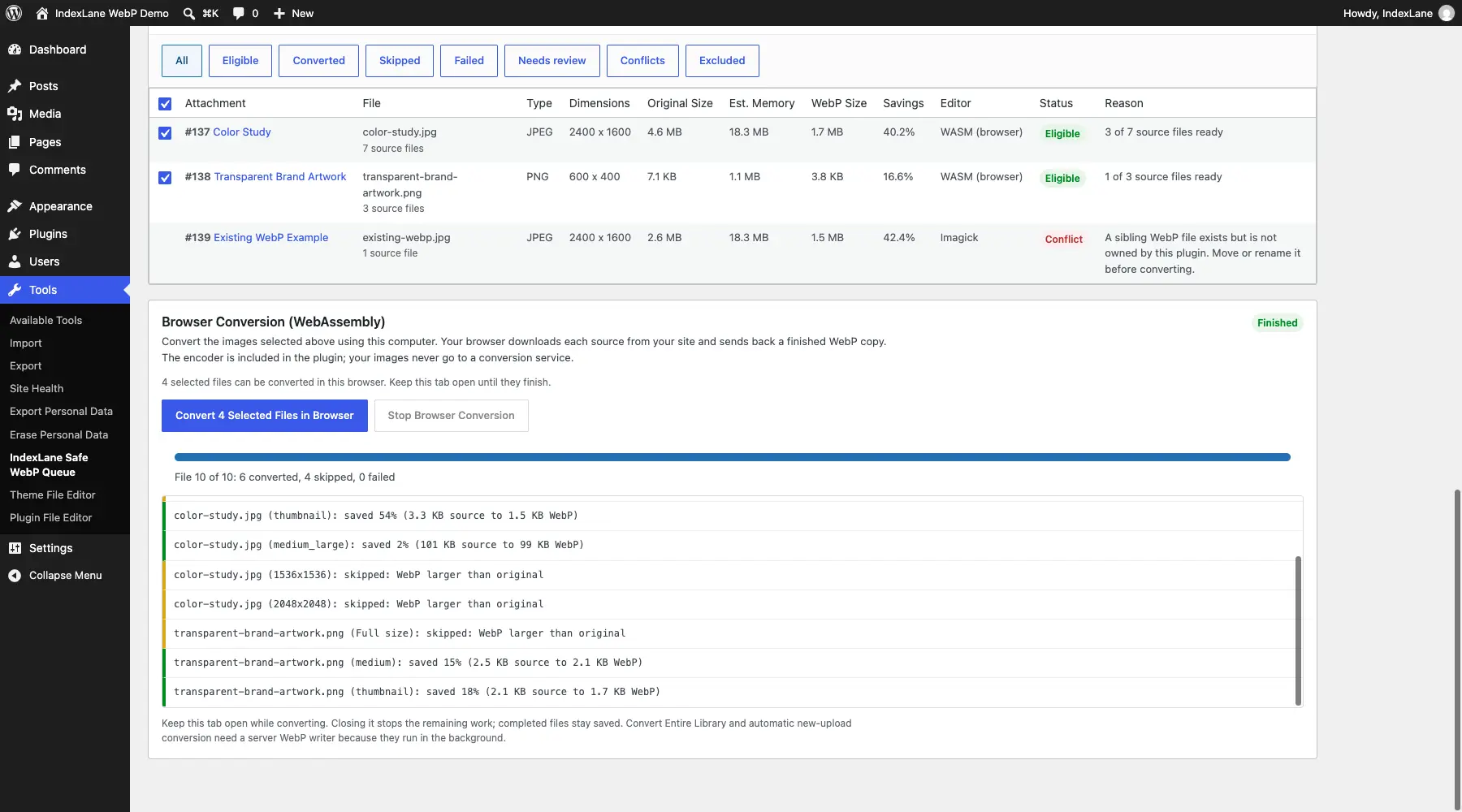
When the server can’t create WebP, use the browser
A WordPress host can handle JPEGs and PNGs and still lack an image editor that can write WebP. That leaves a conversion plugin with very little to do beyond explaining why it cannot convert anything.
For Safe WebP Queue 1.0.0, I’ve added a browser conversion option. A WebP encoder compiled to WebAssembly ships with the plugin and runs in the administrator’s browser. The browser processes the source image, then sends the finished WebP back to WordPress for validation and storage.
There is no external conversion service involved and no separate application to install.
Adding another place to convert images also creates more opportunities for things to get out of sync. Someone can replace the original attachment. The quality setting can change. A previously generated file can be damaged. A server job might already be working on the same images.
Those cases needed handling before I could consider the browser route useful.
Browser saves now recheck the current source and settings. The finished files use the same ownership checks, conflict handling and reporting as server-generated files. Cleanup and totals recalculation also coordinate with conversion work.
An active server job blocks a browser run while it holds the queue. Pausing that job allows browser conversion, and conflicting controls stay disabled during the browser run.
I also fixed a separate server-side bug: the selected quality could be ignored when WordPress changed the output format to WebP. A quality setting needs to affect the conversion it belongs to.
The browser panel checks that the actual worker and codec can run, alongside the required browser features, HTTPS and Content Security Policy. It shows per-file progress, keeps a result log and lets you stop the run.
Testing covered Chrome on WordPress 7.1.1 and Safari on macOS with WordPress 7.1, including JPEGs, transparent PNGs, generated sizes, saved results and larger-output skips. I also added size and conversion-time comparisons for large and small JPEG and PNG files using Chrome, GD and Imagick at quality 80.
There is still a practical limit: browser conversion needs the admin page open. It is optional and off by default. Unattended server conversion and automatic processing of new uploads still need a server that can encode WebP.
On a host without that support, the plugin now explains the limitation before starting an unsupported queue job. Browser-only images are reported as skipped, and automatic upload handling stops retrying work the server cannot perform.